728x90
1. 게시글 수정
1) 수정 페이지
경로 >> src/main/resources/templates/posts-update.mustache
{{>layout/header}}

<h1>게시글 수정</h1>

<div class="col-md-12">
    <div class="col-md-4">
        <form>
            <div class="form-group">
                <label for="id">글 번호</label>
                <input type="text" class="form-control" id="id" value="{{post.id}}" readonly>
            </div>

            <div class="form-group">
                <label for="title">제목</label>
                <input type="text" class="form-control" id="title" value="{{post.title}}" >
            </div>

            <div class="form-group">
                <label for="author">작성자</label>
                <input type="text" class="form-control" id="author" value="{{post.author}}" readonly>
            </div>

            <div class="form-group">
                <label for="content">내용</label>
                <textarea class="form-control" id="content"> {{post.content}}</textarea>
            </div>
        </form>

        <a href="/" role="button" class="btn btn-secondary">취소</a>

        <button type="button" class="btn btn-primary" id="btn-update">수정 완료</button>

    </div>
</div>

{{>layout/footer}}
- {{post.id}} : 머스테치는 객체의 필드 접근 시 점(Dot)으로 구분
- readonly : Input 태그에 읽기 기능만 허용하는 속성, id와 author는 수정할 수 없도록 읽기만 허용하도록 추가
2) update function 기능 추가
경로 >> src/main/resources/static/js/app/index.js
var main = {
        init : function () {
            var _this = this;
            // 생성
            $('#btn-save').on('click', function () {
                _this.save();
                });

            // 수정
            $('#btn-update').on('click', function () {
                _this.update();
            });
        },

        save : function () {
            var data = {
                title: $('#title').val(),
                author: $('#author').val(),
                content: $('#content').val()
            };

            $.ajax({
                type: 'POST',
                url: '/api/v1/posts',
                dataType: 'json',
                contentType: 'application/json; charset=utf-8',
                data: JSON.stringify(data)
            }).done(function() {
                alert('글이 등록되었습니다.');
                window.location.href = '/';     // 글 등록 성곡시 메인페이지(/)로 이동
                }).fail(function (error) {
                alert(JSON.stringify(error));
            });
        },

        update : function () {
            var data = {
                title: $('#title').val(),
                content: $('#content').val()
            };

            var id = $('#id').val();

            $.ajax({
                type: 'PUT',	// 1
                url: '/api/v1/posts/' + id,	// 2
                dataType: 'json',
                contentType: 'application/json; charset=utf-8',
                data: JSON.stringify(data)
            }).done(function () {
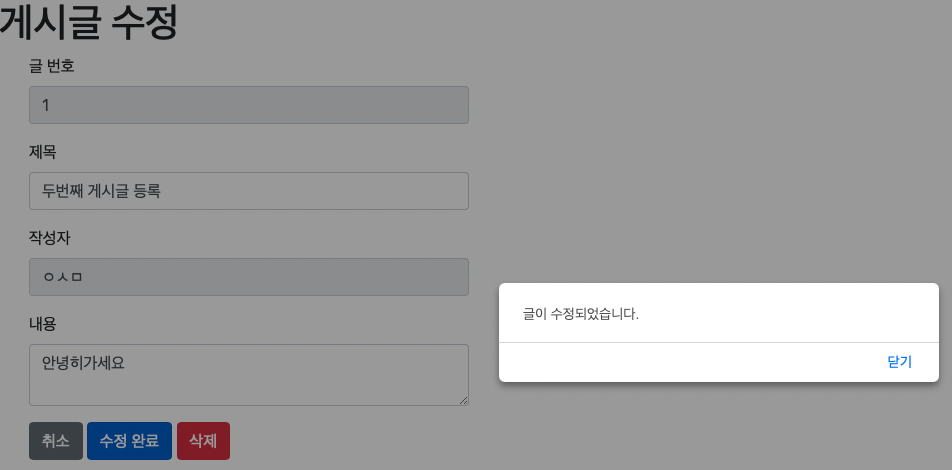
                alert('글이 수정되었습니다.');
                window.location.href = '/';
            }).fail(function (error) {
                alert(JSON.stringify(error));
            });
        }
};

main.init();
1) type : 'PUT'
: REST에서 CRUD는 다음과 같이 HTTP Method에 매핑됩니다.
- 생성(Create) - POST
- 읽기(Read) - GET
- 수정(Update) - PUT
- 삭제(Delete) - DELETE
2) url:'/api/v1/posts/' + id
: 어느 게시글을 수정할지 URL Path로 구분하기 위해 Path에 id를 추가합니다.
3) index.mustache 수정
경로 >> src/main/resources/templates/index.mustache
{{>layout/header}}

<h1> 스프링 부트로 시작하는 웹 서비스 Ver.2 </h1>

<div class="col-md-12">
    <div class="row">
        <div class="col-md-6">
            <a href="/posts/save" role="button" class="btn btn-primary">글 등록</a>
        </div>
    </div>

    <br>

    <!-- 목록 출력 영역 -->
    <table class="table table-horizontal table-bordered">
        <thead class="thead-strong">
        <tr>
            <th>게시글번호</th>
            <th>제목</th>
            <th>작성자</th>
            <th>최종수정일</th>
        </tr>
        </thead>
        <tbody id="tbody">
        {{#posts}}
            <tr>
                <td>{{id}}</td>
                <!-- 추가 -->
                <td><a href="/posts/update/{{id}}">{{title}}</a></td>
                <td>{{author}}</td>
                <td>{{modifiedDate}}</td>
            </tr>
        {{/posts}}
        </tbody>
    </table>
</div>

{{>layout/footer}}
4) IndexController 수정
경로 >> src/main/java/com/project/spring/springboot/web/IndexController
import com.project.spring.springboot.service.posts.PostsService;
import com.project.spring.springboot.web.dto.PostsResponseDto;
import lombok.RequiredArgsConstructor;
import org.springframework.stereotype.Controller;
import org.springframework.ui.Model;
import org.springframework.web.bind.annotation.GetMapping;
import org.springframework.web.bind.annotation.PathVariable;
import org.springframework.web.bind.annotation.PutMapping;

@RequiredArgsConstructor
@Controller
public class IndexController {

    private final PostsService postsService;

    @GetMapping("/")
    public String index(Model model) {
        model.addAttribute("posts", postsService.findAllDesc());
        return "index";
    }

    @GetMapping("/posts/save")
    public String postsSave() {
        return "posts-save";
    }

    // 추가
    @GetMapping("/posts/update/{id}")
    public String postsUpdate (@PathVariable Long id, Model model) {

        PostsResponseDto dto = postsService.findById(id);
        model.addAttribute("post", dto);

        return "posts-update";
    }
}
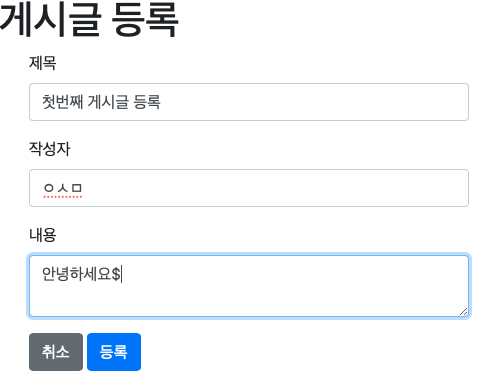
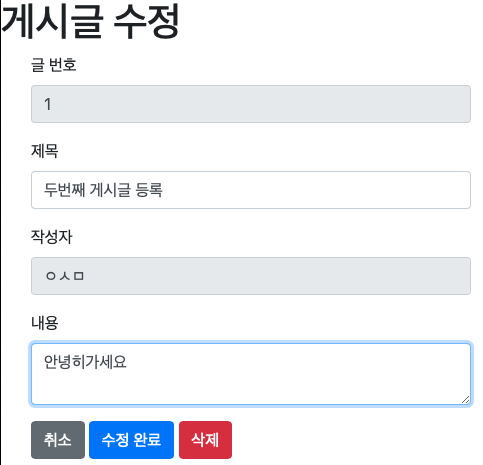
위와 같은 작업을 마친 후 동작해보겠습니다.


728x90
'Spring > 스프링 부트와 AWS로 혼자 구현하는 웹 서비스' 카테고리의 다른 글
| (IntelliJ) 게시글 삭제 화면 구현 (0) | 2021.11.09 |
|---|---|
| (IntelliJ) 전체 조회 화면 만들기 (0) | 2021.11.09 |
| (IntelliJ) 머스테치로 화면 구성 (0) | 2021.11.09 |
| (IntelliJ) JPA Auditing으로 생성/수정 시간 자동화 (0) | 2021.11.04 |
| (IntelliJ) H2 Console 사용 방법 (0) | 2021.11.02 |
